// landing-mockups.jsx — product mockups for the Pote landing.
// Reuses PoteOrb / POTE_COLORS from pote-core.jsx. All static (no app logic).

const C = POTE_COLORS;
const EDGE = { lime: '#B6D300', lavender: '#9C7CE2', cyan: '#7FBDBE', pink: '#C98FAE', orange: '#C97A19' };

// ── small shared atoms ──────────────────────────────────────────────────
function Eyebrow({ children, style = {} }) {
  return <div style={{ fontSize: 10, fontWeight: 900, letterSpacing: '0.5px', textTransform: 'uppercase', color: C.textMuted, ...style }}>{children}</div>;
}

function StatusBar({ dark = false }) {
  const col = dark ? C.white : C.black;
  return (
    <>
      <div style={{ position: 'absolute', top: 9, left: '50%', transform: 'translateX(-50%)', width: 86, height: 24, borderRadius: 13, background: '#0c0b09', zIndex: 50 }} />
      <div style={{ position: 'absolute', top: 14, left: 22, fontSize: 12, fontWeight: 700, color: col, zIndex: 40 }}>9:41</div>
      <div style={{ position: 'absolute', top: 16, right: 22, display: 'flex', gap: 4, alignItems: 'center', zIndex: 40 }}>
        <svg width="13" height="9" viewBox="0 0 16 11"><g fill={col}><rect x="0" y="7" width="2.2" height="4" rx="0.5"/><rect x="3.5" y="5" width="2.2" height="6" rx="0.5"/><rect x="7" y="2.5" width="2.2" height="8.5" rx="0.5"/><rect x="10.5" y="0" width="2.2" height="11" rx="0.5"/></g></svg>
        <svg width="18" height="9" viewBox="0 0 22 11"><rect x="0.5" y="0.5" width="19" height="10" rx="3" fill="none" stroke={col} strokeOpacity="0.4"/><rect x="2" y="2" width="13" height="7" rx="1.5" fill={col}/></svg>
      </div>
    </>
  );
}

// Lightweight phone shell (scales via `scale` prop on a wrapper).
function Phone({ children, w = 300, h = 620, bg = C.paper, scale = 1, dark = false, style = {} }) {
  return (
    <div style={{ width: w * scale, height: h * scale, ...style }}>
      <div style={{
        width: w, height: h, transform: `scale(${scale})`, transformOrigin: 'top left',
        borderRadius: 46, background: '#1a1916', padding: 8, position: 'relative',
        boxShadow: '0 40px 80px rgba(5,5,5,0.22), 0 8px 24px rgba(5,5,5,0.12), 0 0 0 1px rgba(5,5,5,0.14)',
      }}>
        <div style={{ width: '100%', height: '100%', borderRadius: 39, background: bg, overflow: 'hidden', position: 'relative' }}>
          <StatusBar dark={dark} />
          {children}
          <div style={{ position: 'absolute', bottom: 7, left: '50%', transform: 'translateX(-50%)', width: 104, height: 4.5, borderRadius: 3, background: dark ? 'rgba(255,255,255,0.45)' : 'rgba(5,5,5,0.26)', zIndex: 60 }} />
        </div>
      </div>
    </div>
  );
}

// ── Realistic 3D phone frame (titanium rim, side buttons, glare) ──────────
function Phone3D({ w = 300, h = 620, scale = 1, children, style = {} }) {
  return (
    <div className="phone3d-outer" style={{ width: w * scale, height: h * scale, ...style }}>
      <div className="phone3d" style={{ width: w, height: h, transform: `scale(${scale})`, transformOrigin: 'top center' }}>
        <span className="phone-side ps-act" />
        <span className="phone-side ps-up" />
        <span className="phone-side ps-dn" />
        <span className="phone-side ps-pwr" />
        <div className="phone3d-rim">
          <div className="phone3d-screen">
            {children}
            <div className="phone-glare" />
          </div>
        </div>
      </div>
    </div>
  );
}

// Media slot: shows the live app by default; drag an image OR video to swap.
function PhoneMediaSlot() {
  const [media, setMedia] = React.useState(() => {
    try { return JSON.parse(localStorage.getItem('pote_hero_media') || 'null'); } catch (e) { return null; }
  });
  const [over, setOver] = React.useState(false);
  const inputRef = React.useRef(null);

  const handle = (file) => {
    if (!file) return;
    if (file.type.startsWith('image/')) {
      const r = new FileReader();
      r.onload = () => { const d = { type: 'image', url: r.result }; setMedia(d); try { localStorage.setItem('pote_hero_media', JSON.stringify(d)); } catch (e) {} };
      r.readAsDataURL(file);
    } else if (file.type.startsWith('video/')) {
      setMedia({ type: 'video', url: URL.createObjectURL(file) }); // session only (videos are large)
    }
  };
  const clear = (e) => { e.stopPropagation(); setMedia(null); try { localStorage.removeItem('pote_hero_media'); } catch (e2) {} };

  return (
    <div
      onDragOver={(e) => { e.preventDefault(); setOver(true); }}
      onDragLeave={() => setOver(false)}
      onDrop={(e) => { e.preventDefault(); setOver(false); handle(e.dataTransfer.files && e.dataTransfer.files[0]); }}
      onClick={() => inputRef.current && inputRef.current.click()}
      style={{ position: 'absolute', inset: 0, overflow: 'hidden', background: C.paper, cursor: media ? 'default' : 'pointer' }}
    >
      <input ref={inputRef} type="file" accept="image/*,video/*" style={{ display: 'none' }}
        onChange={(e) => handle(e.target.files && e.target.files[0])} />
      {media && media.type === 'image' && <img src={media.url} alt="App Pote" style={{ width: '100%', height: '100%', objectFit: 'cover', display: 'block' }} />}
      {media && media.type === 'video' && <video src={media.url} autoPlay muted loop playsInline style={{ width: '100%', height: '100%', objectFit: 'cover', display: 'block' }} />}
      {!media && <img src="app-home.png" alt="Pantalla de Pote" style={{ width: '100%', height: '100%', objectFit: 'cover', display: 'block' }} />}
      {media && (
        <button onClick={clear} title="Quitar" style={{ position: 'absolute', top: 12, right: 12, zIndex: 90, width: 28, height: 28, borderRadius: 14, border: 'none', background: 'rgba(5,5,5,0.55)', color: '#fff', cursor: 'pointer', fontWeight: 800, fontFamily: 'inherit' }}>×</button>
      )}
      {over && (
        <div style={{ position: 'absolute', inset: 0, display: 'flex', alignItems: 'center', justifyContent: 'center', background: 'rgba(5,5,5,0.6)', color: C.white, zIndex: 95, borderRadius: 38 }}>
          <div style={{ textAlign: 'center' }}>
            <div style={{ fontSize: 14, fontWeight: 800 }}>Suelta tu imagen o vídeo</div>
            <div style={{ fontSize: 11, fontWeight: 600, opacity: 0.7, marginTop: 4 }}>de la app de Pote</div>
          </div>
        </div>
      )}
    </div>
  );
}

function NameTag({ children, color }) {
  return (
    <span style={{
      display: 'inline-flex', alignItems: 'center', gap: 5, padding: '4px 10px', borderRadius: 999,
      background: C.black, color: C.white, fontSize: 11, fontWeight: 800, letterSpacing: '-0.1px', whiteSpace: 'nowrap',
      boxShadow: '0 4px 10px rgba(5,5,5,0.18)',
    }}>
      {color && <span style={{ width: 7, height: 7, borderRadius: 4, background: C[color] }} />}
      {children}
    </span>
  );
}

function DayCell({ d, n, active, done, dot }) {
  return (
    <div style={{ flex: 1, display: 'flex', flexDirection: 'column', alignItems: 'center', gap: 4 }}>
      <div style={{ fontSize: 8, fontWeight: 800, letterSpacing: '0.3px', color: C.textMuted }}>{d}</div>
      <div style={{
        width: 28, height: 34, borderRadius: 12, display: 'flex', flexDirection: 'column', alignItems: 'center', justifyContent: 'center', gap: 2,
        background: active ? C.black : 'transparent', color: active ? C.white : C.black,
      }}>
        <span style={{ fontSize: 13, fontWeight: 800 }}>{n}</span>
        {dot && <span style={{ width: 5, height: 5, borderRadius: 3, background: active ? C.lime : (done ? C.lime : 'rgba(5,5,5,0.14)') }} />}
      </div>
    </div>
  );
}

// ── HERO HOME — the signature home screen ─────────────────────────────────
function AppHome() {
  const { t } = useT(); const m = t.mock;
  return (
    <div style={{ position: 'absolute', inset: 0, padding: '44px 16px 0', fontFamily: 'inherit', color: C.black }}>
      {/* header */}
      <div style={{ display: 'flex', alignItems: 'flex-start', justifyContent: 'space-between' }}>
        <div>
          <div style={{ fontSize: 10, fontWeight: 900, letterSpacing: '0.5px', color: C.textMuted }}>{m.today}</div>
          <div style={{ fontSize: 25, fontWeight: 800, letterSpacing: '-1px', marginTop: 1 }}>{m.date}</div>
        </div>
        <div style={{ display: 'flex', alignItems: 'center', gap: 8 }}>
          <div style={{ display: 'flex', background: C.white, borderRadius: 999, padding: 3, boxShadow: '0 0 0 1px rgba(5,5,5,0.07)' }}>
            <span style={{ padding: '4px 11px', borderRadius: 999, background: C.black, color: C.white, fontSize: 11, fontWeight: 800 }}>{m.day}</span>
            <span style={{ padding: '4px 11px', fontSize: 11, fontWeight: 700, color: C.textMuted }}>{m.week}</span>
          </div>
          <div style={{ width: 32, height: 32, borderRadius: 16, background: C.white, boxShadow: '0 0 0 1px rgba(5,5,5,0.07)', display: 'flex', alignItems: 'center', justifyContent: 'center', position: 'relative' }}>
            <svg width="15" height="15" viewBox="0 0 24 24" fill="none" stroke={C.black} strokeWidth="2" strokeLinecap="round" strokeLinejoin="round"><path d="M6 8a6 6 0 0 1 12 0c0 7 3 9 3 9H3s3-2 3-9"/><path d="M10 21a2 2 0 0 0 4 0"/></svg>
            <span style={{ position: 'absolute', top: 6, right: 7, width: 6, height: 6, borderRadius: 3, background: C.orange }} />
          </div>
        </div>
      </div>

      {/* week strip */}
      <div style={{ display: 'flex', marginTop: 14, gap: 2 }}>
        <DayCell d={m.days[0]} n="22" done dot />
        <DayCell d={m.days[1]} n="23" dot />
        <DayCell d={m.days[2]} n="24" done dot />
        <DayCell d={m.days[3]} n="25" active dot />
        <DayCell d={m.days[4]} n="26" dot />
        <DayCell d={m.days[5]} n="27" dot />
        <DayCell d={m.days[6]} n="28" dot />
      </div>

      {/* capacity card */}
      <div style={{ marginTop: 14, background: C.white, borderRadius: 18, padding: '13px 15px', boxShadow: '0 1px 0 rgba(5,5,5,0.03), 0 0 0 1px rgba(5,5,5,0.06)' }}>
        <div style={{ display: 'flex', justifyContent: 'space-between', alignItems: 'flex-start' }}>
          <Eyebrow>{m.capacity}</Eyebrow>
          <span style={{ fontSize: 10, fontWeight: 800, color: C.black, background: C.paper, padding: '3px 9px', borderRadius: 999, boxShadow: '0 0 0 1px rgba(5,5,5,0.06)' }}>{m.adjust}</span>
        </div>
        <div style={{ display: 'flex', alignItems: 'baseline', gap: 4, marginTop: 4 }}>
          <span style={{ fontSize: 16, fontWeight: 800 }}>$</span>
          <span style={{ fontSize: 34, fontWeight: 800, letterSpacing: '-1.5px', fontVariantNumeric: 'tabular-nums' }}>245</span>
          <span style={{ fontSize: 15, fontWeight: 700, color: C.textMuted }}>/ $300</span>
        </div>
        <div style={{ marginTop: 9, height: 9, borderRadius: 5, background: 'rgba(5,5,5,0.06)', overflow: 'hidden', display: 'flex', gap: 2, boxShadow: 'inset 0 1px 1.5px rgba(5,5,5,0.1)' }}>
          <div style={{ width: '34%', background: C.lime }} />
          <div style={{ width: '26%', background: C.lavender }} />
          <div style={{ width: '21%', background: C.cyan }} />
        </div>
      </div>

      {/* tabs */}
      <div style={{ display: 'flex', alignItems: 'flex-end', justifyContent: 'space-between', marginTop: 16 }}>
        <div style={{ display: 'flex', gap: 14, alignItems: 'flex-end' }}>
          <span style={{ position: 'relative', fontSize: 15, fontWeight: 800, letterSpacing: '-0.4px', paddingBottom: 5 }}>{m.priority}<span style={{ position: 'absolute', left: 0, right: 0, bottom: 0, height: 3, borderRadius: 2, background: C.black }} /></span>
          <span style={{ fontSize: 15, fontWeight: 700, letterSpacing: '-0.4px', color: 'rgba(5,5,5,0.3)', paddingBottom: 5 }}>{m.thisWeek}</span>
        </div>
        <span style={{ fontSize: 11, fontWeight: 800, color: C.textMuted }}>{m.viewPlan} →</span>
      </div>

      {/* orb cluster */}
      <div style={{ position: 'relative', height: 196, marginTop: 6 }}>
        <FloatOrb name={m.gSummer} color="lime" progress={0.32} size={112} x={2} y={2} />
        <FloatOrb name={m.gConcert} color="cyan" progress={0.56} size={88} x={152} y={28} />
        <FloatOrb name={m.gEmergency} color="lavender" progress={0.40} size={74} x={24} y={112} />
        <div style={{ position: 'absolute', left: 156, top: 130 }}>
          <PoteOrb color="pink" progress={0.74} size={48} animate seed={6} showPercent={false} />
        </div>
      </div>

      {/* tab bar + fab */}
      <div style={{ position: 'absolute', left: 14, right: 14, bottom: 36, display: 'flex', alignItems: 'center', gap: 8 }}>
        <div style={{ flex: 1, height: 50, borderRadius: 25, background: C.black, display: 'flex', padding: 4, gap: 3 }}>
          <TabSeg active>{m.tabHome}</TabSeg>
          <TabSeg>{m.tabActivity}</TabSeg>
          <TabSeg>{m.tabProfile}</TabSeg>
        </div>
        <div style={{ width: 50, height: 50, borderRadius: 25, background: C.lime, display: 'flex', alignItems: 'center', justifyContent: 'center', boxShadow: '0 8px 20px rgba(203,232,0,0.45), 0 2px 0 #7C9300' }}>
          <svg width="22" height="22" viewBox="0 0 24 24" fill="none" stroke={C.black} strokeWidth="3" strokeLinecap="round"><path d="M12 5v14M5 12h14"/></svg>
        </div>
      </div>
    </div>
  );
}

function TabSeg({ children, active }) {
  return (
    <div style={{ flex: 1, borderRadius: 23, display: 'flex', alignItems: 'center', justifyContent: 'center', background: active ? C.lime : 'transparent', color: active ? C.black : C.white, fontSize: 11, fontWeight: 800 }}>{children}</div>
  );
}

function FloatOrb({ name, color, progress, size, x, y }) {
  return (
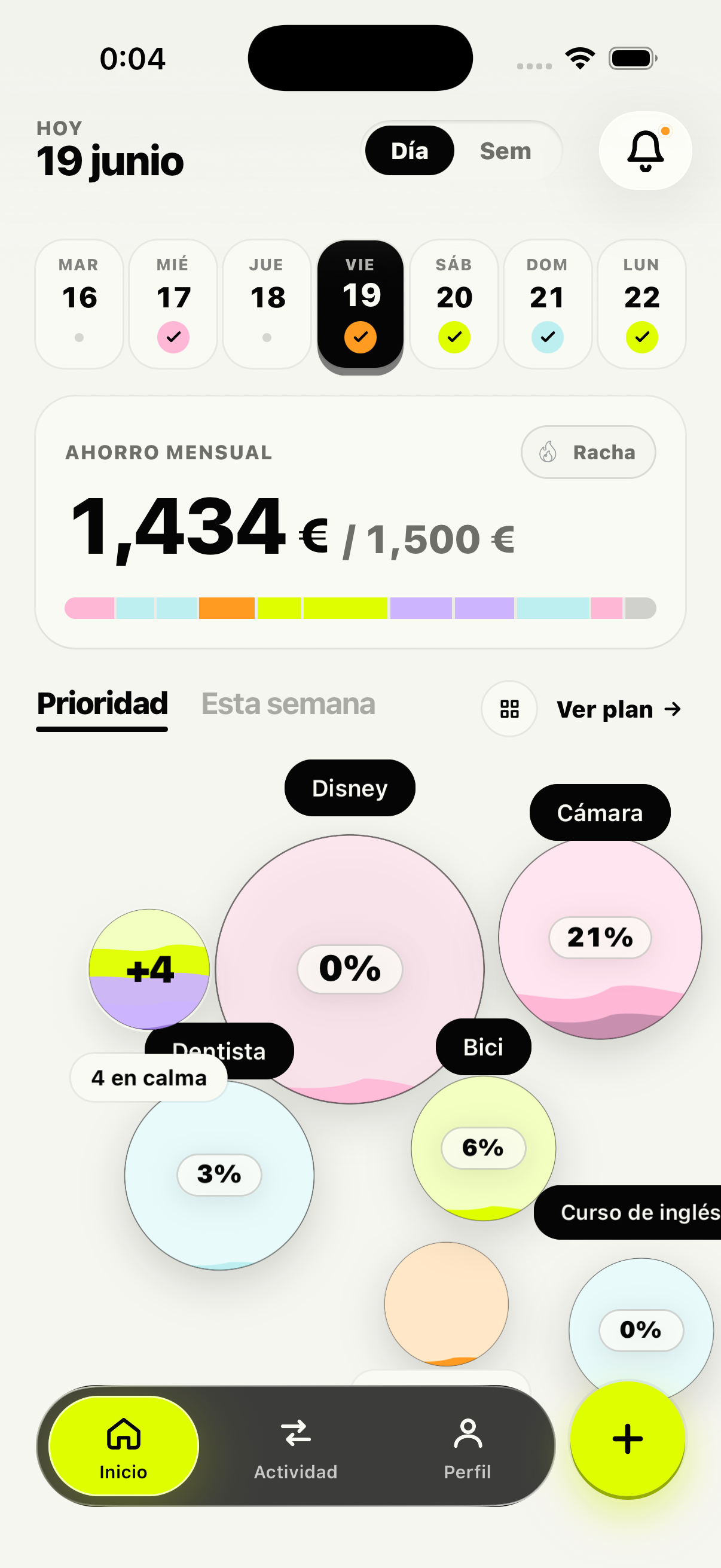
    <div style={{ position: 'absolute', left: x, top: y }}>
      <div style={{ position: 'absolute', left: '50%', top: -12, transform: 'translateX(-50%)', zIndex: 2 }}>
        <NameTag>{name}</NameTag>
      </div>
      <PoteOrb color={color} progress={progress} size={size} animate seed={x + y} />
    </div>
  );
}

Object.assign(window, { C, EDGE, Eyebrow, StatusBar, Phone, Phone3D, PhoneMediaSlot, NameTag, DayCell, AppHome, TabSeg, FloatOrb });
